Power BI Embedded vs Power BI Service: Which Is Right for Your Application?
Key Takeaways
- Power BI Service is best for internal dashboards and team reporting. It is easy to set up and works well for employees.
- Power BI Embedded is best for apps and SaaS products. It lets you show dashboards inside your own product.
- Pricing works very differently. Service charges per user, while Embedded charges based on capacity.
- Embedded gives more control and customization. Service is simpler but has limits.
- Many companies use both together. Service is used for internal teams, and Embedded is used for customer-facing analytics.
Power BI Service vs Embedded: Feature Comparison
| Factor | Power BI Service | Power BI Embedded |
|---|---|---|
| Best for | Internal dashboards | Analytics inside apps |
| Users | Employees, internal teams | Customers, external users |
| Access | Power BI web portal | Inside your application |
| Setup effort | Low | Medium to high |
| Developer involvement | Minimal | Required |
| Embedding | Limited (iframe) | Full embedding via APIs |
| Customization | Limited | Full control |
| Branding | Microsoft branding | Your app branding |
| Pricing model | Per user | Capacity-based (Azure) |
| External access | Complex and costly | Built for it |
| Scalability | Limited by licenses | Scales with capacity |
| Security model | User-based (login) | App-based (tokens) |
Many teams get confused between Power BI Service and Power BI Embedded. Both come from Microsoft. Both work with reports and dashboards. But they solve very different problems.
This confusion often leads to wrong choices. Choosing the wrong option can create issues like:
- Higher licensing cost than expected
- Poor user experience in your application
- Limited scaling when users grow
- Extra engineering effort later
Power BI is widely used in modern embedded business intelligence software setups. But the deployment model changes everything.
This blog will help you understand:
- When Power BI Service is enough
- When Power BI Embedded is required
- Which one fits your application type
- How to avoid costly architecture mistakes
Quick Answer: Which One Should You Use?
- Use Power BI Service if you need dashboards for internal teams
- Use Power BI Embedded if you want analytics inside your product or application
Here’s a quick decision guide based on specific use cases.
- Internal reporting for employees – Use Power BI Service
- Customer-facing dashboards in SaaS apps – Use Power BI Embedded
- Mixed use cases – You may need both
What Is Power BI Service?
Power BI Service is a cloud-based BI platform from Microsoft. It is used to create, view, and share dashboards inside an organization.
It is part of Microsoft’s business intelligence and data analytics services ecosystem.
Who uses Power BI Service
It is mainly used by:
- Business analysts
- Managers and executives
- Internal teams
- Data analysts
Where it runs
- Fully hosted on Microsoft cloud (SaaS model)
- No infrastructure setup needed
What it is best for
- Internal dashboards
- Company-wide reporting
- Data visualization for teams
- Self-service analytics
Key limitation
Power BI Service is not designed for deep embedding inside external applications. It is mainly an internal BI tool.
What Is Power BI Embedded?
Power BI Embedded is designed to place Power BI analytics inside your own application. It is part of Microsoft Azure. Power BI Embedded is used by SaaS platforms and product companies.
Who uses Power BI Embedded
- SaaS companies
- ISVs (Independent Software Vendors)
- Product engineering teams
- Platform builders
Where it runs
- Azure capacity-based environment
- Controlled by your application backend
What it is best for
- Embedding dashboards inside apps
- Customer-facing analytics
- White-labeled reporting experiences
- Multi-tenant SaaS platforms
Key advantage
You control how analytics looks and behaves inside your product UI. This is why firms using embedded business intelligence software choose this model.
Power BI Service vs Embedded: Key Differences
| Factor | Power BI Service | Power BI Embedded |
| Target users | Internal employees | External customers |
| Purpose | BI reporting platform | Embedded analytics layer |
| Access method | Web portal | API integration |
| Customization | Limited | Full control |
| Branding | Microsoft UI | Your app branding |
| Pricing model | Per user | Capacity-based |
| Scalability | Limited by licenses | Scales via Azure capacity |
Architecture Difference: How They Actually Work
Both tools use the same Power BI engine. However, the way they are delivered is very different.
Power BI Service architecture (SaaS model)
Power BI Service follows a standard SaaS approach. Everything is managed by Microsoft. The users interact directly with the Power BI platform. This is how it works:
- User opens Power BI in a browser
- User logs in using their work account
- Power BI checks permissions via Microsoft Entra ID
- Reports are loaded from a workspace
- User interacts with dashboards inside the Power BI portal
Power BI Embedded architecture (app-driven model)
Power BI Embedded works very differently. Here, your application becomes the main interface. It’s working is as follows:
- User logs into your application
- Your backend authenticates with Power BI
- Your app generates an embed token
- Power BI sends report data securely
- Report is rendered inside your app UI
How this affects your choice
This detail directly impacts the user experience.
- Service keeps Microsoft as the entry point
- Embedded makes your app the entry point
This is why:
- Service is easier to set up
- Embedded gives more control and flexibility
Embedding Capability: Why Power BI Service Falls Short
Power BI Service does allow limited embedding using iframe. But it is restricted.
Limitations of Service embedding
- Weak UI customization
- Microsoft branding stays visible
- Limited control over layout
- Authentication issues for external users
Why Embedded exists
Power BI Embedded was created to solve SaaS needs. It supports full integration inside applications.
This is critical for companies offering business intelligence services company solutions to clients.
Developer Experience: Embedded vs. Service
Power BI Service
- Low-code or no-code usage
- Focused on business users
- Simple dashboard creation
Power BI Embedded
- Developer-first model
- Uses APIs and SDKs
- Requires authentication setup
- Supports multi-tenant architecture
Time-to-build comparison
- Service setup: fast (hours to days)
- Embedded setup: longer (days to weeks)
But Embedded gives long-term scalability.
Embed for Your Customers vs. Embed for Your Organisation
If you are a developer or building a SaaS product, you must know this.There are two ways to embed Power BI:
- Embed for your organisation
- Embed for your customers
These are also called:
- User owns data (UOD)
- App owns data (AOD)
Embed for your organisation (User owns data)
In this model, the user logs in with their own Power BI account. They already have access to the data. So, your app does not control access. Power BI does.
How it works
- User signs in using Azure Active Directory
- Power BI checks permissions
- Report is shown based on user access
When to use this
This model works best for internal use.
- Employees accessing dashboards
- Internal tools or portals
- Company-wide reporting systems
Key characteristics
- Requires Power BI licenses for each user
- Easier to set up
- Limited control for developers
Embed for your customers (App owns data)
In this model, your application controls everything. The end user does not need a Power BI account. This is the model used in most SaaS products.
How it works
- Your app authenticates with Power BI
- Your backend generates embed tokens
- Users see reports inside your app without logging into Power BI
When to use this
This model is ideal for external users.
- Customer dashboards in SaaS apps
- Partner portals
- White-labeled analytics products
Key characteristics
- No Power BI license needed for end users
- Full control over user experience
- Requires backend and API integration
Side-by-side comparison
| Factor | Embed for Organisation (UOD) | Embed for Customers (AOD) |
| Authentication | User logs in | App handles login |
| Power BI account needed | Yes | No |
| Best for | Internal users | External users |
| Developer control | Limited | Full control |
| Licensing | Per user | Capacity-based |
| Complexity | Lower | Higher |
Power BI Embedded Step-by-Step Setup Overview
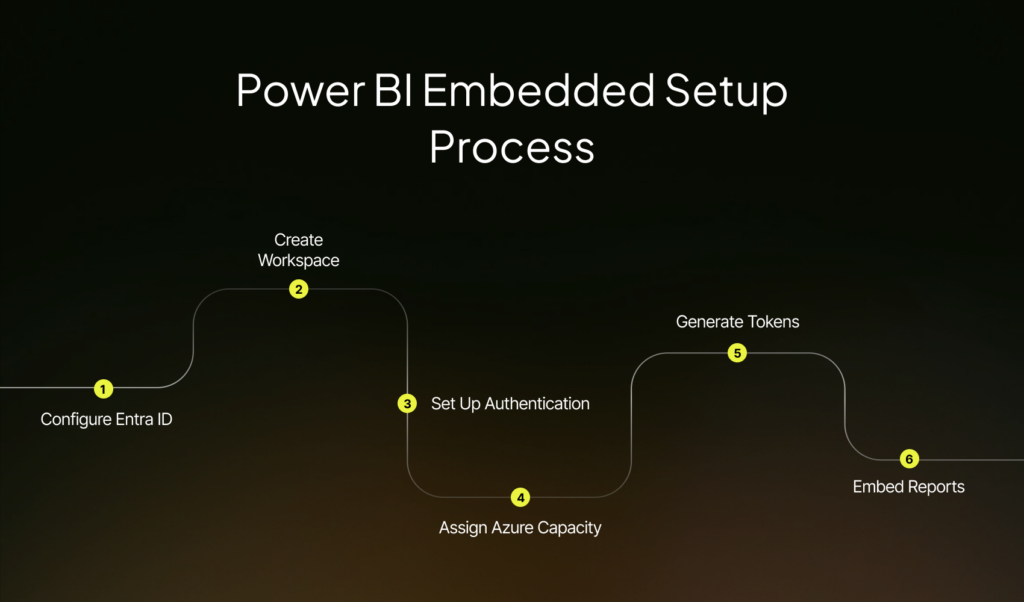
If you are planning to use Power BI Embedded, you must understand the setup flow.
What you need before you start
Before you begin, make sure you have these basics ready:
- An active Azure account
- A Microsoft Entra ID tenant (formerly Azure Active Directory)
- At least one Power BI Pro license (for development)
- A sample dataset or report
Step 1: Set up your Microsoft Entra ID tenant
This is your identity system. It manages authentication and permissions.
- Create or use an existing Entra ID tenant
- Register your application inside it
- Note down the client ID and tenant ID
Step 2: Create a Power BI workspace
Now, you need a place to store your reports and datasets.
- Go to Power BI Service
- Create a new workspace
- Upload your reports (.pbix files)
- Assign access permissions
Step 3: Set up a service principal
A service principal is how your application talks to Power BI without a user logging in. This is a key part of the “app owns data” model.
- Register an app in Entra ID
- Create a client secret
- Enable service principal access in Power BI Admin settings
- Add the service principal to your workspace
Step 4: Choose and configure capacity (A-SKU)
Next, you need to assign your workspace to a Power BI Embedded capacity.
- Create an A-SKU capacity in Azure
- Assign your workspace to this capacity
- Monitor usage and scale if needed
Step 5: Generate embed tokens
Embed tokens allow your app to show reports to users. They control what data each user can access.
- Use Power BI REST APIs
- Generate embed tokens from your backend
- Apply row-level security if needed
Step 6: Embed reports in your application
Finally, you connect everything to your frontend.
- Use Power BI JavaScript SDK
- Pass embed URL and token to your frontend
- Render the report inside your app UI
What developers should keep in mind
Before you start building, keep these points in mind:
- Backend setup is required for secure embedding
- Token generation must never happen on the frontend
- Capacity planning affects performance and cost
- Proper security setup avoids data leaks
Pricing Comparison: What Will It Cost You?
Power BI Embedded pricing (Azure A-SKUs)
Power BI Embedded uses Azure-based, pay-as-you-go pricing. You pay for capacity, not for users.
Here are the commonly used tiers:
| SKU | Monthly Cost (Approx) | Typical Use Case |
| A1 | $735/month | Small apps, testing, low traffic |
| A2 | $1,470/month | Growing apps, moderate usage |
| A3 | $2,940/month | Production workloads |
| A4 | $5,880/month | High usage apps |
| A5 | $11,760/month | Large-scale SaaS |
| A6 | $23,520/month | Enterprise-grade scale |
What this means for you
- You can start small with A1 and scale up as users grow
- You are not charged per user
- Thousands of users can access reports without extra licensing
This is why embedded business intelligence software models work well for SaaS products.
Power BI Service pricing (updated 2025)
Power BI Service uses a per-user pricing model. Microsoft increased prices in April 2025 after many years.
Updated pricing:
| Plan | Price (per user/month) | Best For |
| Power BI Pro | $14 | Small teams, internal sharing |
| Premium Per User (PPU) | $24 | Advanced features for individuals |
What changed and why it matters
- Power BI Pro increased from $10 to $14
- Premium Per User increased from $20 to $24
- This is the first major price change in nearly 10 years
How to think about cost
Suppose you have a small internal team:
- 20 users × $14 = $280/month
- Power BI Service is clearly cheaper
If you have a SaaS product:
- There are 1,000+ users. So, Power BI Service cost grows fast
- Embedded stays fixed at capacity cost
Choose the right Power BI Deployment.
Microsoft Fabric + 2025 Licensing Update
Things have changed recently. So, if you are comparing Power BI Service and Embedded, you need to understand this update.
From January 1, 2025, Microsoft stopped new purchases and renewals of Power BI Premium P-SKU licenses. Instead, Microsoft moved everything toward Microsoft Fabric capacity.
Earlier, companies used Premium capacity (P-SKU) for:
- Large-scale Power BI deployments
- Sharing reports without per-user licensing
- Handling enterprise workloads
Now, Fabric replaces that model.
Power BI now runs inside Microsoft Fabric
Power BI is no longer a standalone platform at scale. It is now part of Microsoft Fabric. Fabric includes:
- Data engineering
- Data warehousing
- Real-time analytics
- Power BI
Fabric vs. Old Premium Model
| Factor | Old Premium (P-SKU) | Microsoft Fabric |
| Licensing model | Fixed capacity (P-SKU) | Fabric capacity (F-SKU) |
| Product scope | Power BI only | Full data platform |
| Purchase model | Premium subscription | Fabric capacity via Azure |
| Future support | Being phased out | Fully supported |
Impact of the Update on Power BI Service
Power BI Service still exists. But its enterprise scaling now depends on Fabric capacity instead of Premium. This leads to a few important changes:
- Large deployments now require Fabric capacity
- Licensing is more unified across data workloads
- Costs may shift depending on usage patterns
So, Service is still great for internal BI. But at scale, it is tied to Fabric.
Impact of the Update on Power BI Embedded
Power BI Embedded already uses Azure capacity. So, the transition is more natural here. However, there are still some key effects:
- Fabric brings deeper integration with data pipelines
- Embedded analytics can now connect with broader Fabric workloads
- Pricing and capacity planning may change slightly
For SaaS companies, this actually improves long-term flexibility.
Security & User Access Differences
Security decides who sees what data, how users access reports, and how your app controls everything.
Power BI Service security (user-driven model)
Power BI Service is built for internal users. It uses Microsoft Entra ID (Azure Active Directory) for authentication.
How it works
- User logs in with their work account
- Microsoft verifies identity
- Access is controlled using roles and permissions
- Reports are shared via workspaces or apps
This model is simple. But it assumes every user is part of your organization.
Key points
- Each user needs a Power BI license
- Access is tied to user identity
- Easy to manage for internal teams
Power BI Embedded security (app-driven model)
In Power BI Embedded, your application controls authentication and access. There are two main ways to handle authentication.
Service principal vs master user (important distinction)
Before you embed reports, your app needs to authenticate with Power BI. There are two approaches.
Service principal (recommended)
- Uses an app identity instead of a human user
- Registered in Microsoft Entra ID
- Works well for production and SaaS apps
Benefits that it offers are:
- More secure
- No dependency on a user account
- Better for automation and scaling
Master user (older approach)
- App logs in using username and password
- That user owns the reports and data
Limitations of this method include:
- Not ideal for production
- Harder to manage securely
- Can break if credentials change
Embed tokens: How access is controlled
Once your app is authenticated, it needs to show reports to users. This is done using embed tokens. Embed tokens work in the following manner:
- Your backend requests a token from Power BI
- Token includes permissions and dataset access
- Token is sent to frontend
- Report loads inside your app
These tokens are short-lived and secure. They allow users to view reports without logging into Power BI.
Row-level security (RLS) in practice
Both Power BI Service and Embedded support row-level security. But the way it is applied feels different. RLS ensures users only see the data they are allowed to see. For example:
- A sales manager sees only their region
- A customer sees only their own data
How RLS works in Power BI Service
- Roles are defined in the dataset
- Users are assigned to roles
- Power BI automatically filters data
How RLS works in Power BI Embedded
- Roles are still defined in the dataset
- Your app passes user identity in the embed token
- Power BI applies filters based on that identity
How this affects your choice
If you choose Service:
- Setup is simple
- Security is handled by Microsoft
- Best for internal users
If you choose Embedded:
- You control everything
- You can support external users
- You need proper backend and security setup
Performance & Scalability: Which Handles Growth Better?
Power BI Service limits
- Shared capacity limits
- Performance depends on licensing tier
- Not ideal for heavy external usage
Power BI Embedded scaling
- Uses dedicated Azure capacity
- Scales based on demand
- Better for high traffic applications
Key insight
Embedded performs better when you expect rapid user growth.
Customization & Branding Control
Power BI Service
- Microsoft UI is fixed
- Limited branding options
- Standard dashboard layout
Power BI Embedded
- Full white-label control
- Custom UI inside your product
- Seamless user experience
This is why SaaS companies prefer embedded business intelligence software models.
Decision Framework: How to Choose the Right One
Here’s how to make the best decision.
Ask these questions
- Is your audience internal or external?
- Do you need analytics inside your application?
- Do you need full UI control?
- Will the user base scale beyond employees?
- Do you have developers available?
Simple mapping
- Power BI Service is most suited for Internal reporting and BI
- Power BI Embedded is best for product analytics layer inside applications
When You Might Need Both
Some companies use both together.
Common hybrid setup
- Power BI Service for internal reporting
- Power BI Embedded for customer dashboards
Why this happens
- Internal teams need fast BI
- Customers need embedded analytics
This hybrid model is common in mature data-driven companies using business intelligence and data analytics services at scale.
How Imenso Delivers Power BI in Practice
Imenso Software is a leading business intelligence services provider. We focus on end-to-end delivery and can handle:
- Data integration from multiple sources like CRM, ERP, and databases
- Building clean data models using ETL pipelines
- Creating interactive dashboards for real-time insights
- Setting up row-level security for controlled access
- Enabling scheduled and real-time data refresh
- Embedding reports inside applications
We cover both Power BI Service and Power BI Embedded use cases.
Our Work
We are committed to enabling businesses to identify gaps and capture key business opportunities through data-driven insights.
1. Shipping industry dashboard
This is a classic internal BI use case.
- Built a full analytics dashboard
- Used row-level security to control access
- Added slicers and filters for deep analysis
- Enabled scheduled data refresh
2. Financial services dashboard
Our dashboards support fast decisions in finance.
- Real-time data refresh setup
- Trend analysis for decision-making
- Custom navigation and visuals
3. Productivity and growth analytics
This is useful for business teams tracking performance.
- Custom visuals and interactive UI
- Page-level and visual-level filters
- KPI tracking using charts and gauges
4. Embedded analytics solution
It’s a direct example of real-world embedded business analytics.
- API-driven data integration
- Multi-time frame comparisons (like monthly vs yearly)
- Embedded reports inside applications
Our process
Their delivery approach is structured. This reduces risk and speeds up results. Here’s the usual flow:
- Understand business goals and data challenges
- Assess existing data systems
- Build a Power BI roadmap
- Develop dashboards and data models
- Train teams and provide support
- Continuously optimize performance
We aim to help you achieve unprecedented results with our Power BI-led business intelligence solutions.
Power BI Embedded vs Service: Final Verdict
Both tools are powerful. But they solve different problems.
Simple summary
- Power BI Service is for internal users and reporting
- Power BI Embedded is for application-based analytics
Final recommendation
- Choose Service if your goal is internal dashboards and reporting
- Choose Embedded if your goal is to build analytics into your product
If you are building a SaaS product or working with a business intelligence services company, Embedded is usually the better long-term choice.