Digital Transformation Roadmap: From Legacy Systems to Cloud-Native Platforms (Enterprise Guide 2026)
Key Takeaways
- Start with business goals. They ensure every tech decision support real business outcome.
- Break the journey into clear phases. Smaller phases reduce risk and improve speed.
- Data and architecture matter more than tools. Tools change fast, but structure stays longer.
- Change management matters as much as tech. People resist change more than systems do.
What Is a Digital Transformation Roadmap?
A digital transformation is a systematic plan. Its aim is to transition a business from legacy to modern systems. The roadmap is comprehensive. It also specifies goals, time frames and the tech stack.
Enterprises need structure because systems are deeply linked. A small change in billing can affect reporting and customer apps. Without a plan, things break fast.
Cloud migration is only one part of transformation. It moves systems to the cloud but does not fix design issues. Digital transformation changes how systems are built and used.
Why Legacy Systems Slow Down Growth
Legacy systems run on old code and outdated setups. But this is not the only problem. The real issue is how they slow everything around them. Updates that should take hours often take weeks. Even small changes go through long testing cycles.
Over time, these systems need niche skills. Finding engineers who understand old languages like COBOL is not easy. When something breaks, fixes are often manual. This increases downtime and raises support costs.
Where the money goes
- Maintenance and support take the biggest share
- Licensing costs for outdated tools keep rising
- Manual processes increase operational effort
- Delays in releases affect revenue opportunities
Then come the hidden risks. Security patches are slow. This leaves gaps open longer. Data often sits in silos across teams and tools. As a result, systems struggle to talk to each other.
Integration becomes fragile over time. One small change in one system can affect multiple others. This increases the risk of failures during updates.
Technical debt builds up fast
Technical debt shows up as:
- Code becomes harder to understand and change
- New features take longer to build
- Bugs increase with every release
- System performance starts to drop
Step 1: Define Clear Business Goals
Start with outcomes. What does the business want to achieve? Cost savings, faster releases, or better customer journeys? Pick one first.
Teams often try to fix everything at once. That leads to confusion and delays. Clear goals keep teams aligned and focused.
Business and tech teams must agree early. Misalignment creates rework later. Why build fast if it solves the wrong problem?
Step 2: Assess Your Current Systems
Conduct a full system audit. Look at applications, data, and infrastructure. Each part plays a role in transformation.
Then, identify what to keep, upgrade, or replace. You don’t need to change everything. Some systems can stay with small fixes.
In many enterprises, billing systems stay while front-end apps change first. This reduces risk and keeps revenue flows stable during upgrades.
Step 3: Choose the Right Transformation Approach
These three factors shape the entire decision.
- System age
Older systems often need deeper changes. Newer ones may only need small tweaks. - Integration complexity
Systems connected to many others are harder to change. One wrong move can break multiple flows. - Risk tolerance
Some businesses can handle disruption. Others need stable, low-risk changes.
Common transformation approaches (The 7 Rs)
| Approach | What It Means | When to Use | When NOT to Use |
| Rehost | Move as-is to cloud (lift and shift) | Quick migration, low change needed | When system has major design issues |
| Re-platform | Move with small optimizations | Moderate improvement needed | When deep performance issues exist |
| Refactor | Change code structure | Better scaling and flexibility needed | When timelines are very tight |
| Re-architect | Redesign system structure | Complex systems needing long-term scale | When budget is limited |
| Rebuild | Build from scratch | System is outdated beyond repair | When system logic is still useful |
| Replace | Use a new product or SaaS | Standard functions like CRM or HR | When heavy customization is required |
| Retire | Remove system completely | System is no longer needed | When dependencies still exist |
The Strangler Fig Pattern (A safer way to modernize)
Big rewrites are risky and slow. That is where the Strangler Fig pattern helps.
Instead of replacing the whole system at once, you replace it piece by piece. New services slowly take over old functions. Over time, the old system fades out completely.
This approach works well for large, critical systems. For example, an eCommerce platform can replace its checkout service first. Then move inventory, then user accounts. Each step reduces risk.
Gradual change keeps the business running while systems improve.
What to Choose?
Use this simple thinking model to decide.
- Rehost or Re-platform
Use this if speed is critical.
- Refactor or Re-architect
Suits enterprises wanting to scale.
- Rebuild or Replace
This is ideal if your system is too old.
- Retire
Choose this if your system offers no value.
Step 4: Design Your Future Architecture
Cloud-native systems
Think in modules, not monoliths. Cloud-native systems use smaller services that work together. Each service handles one function.
APIs
APIs connect these services. They allow systems to talk without tight coupling. This improves speed and flexibility.
Microservices
Microservices scale better than large single systems. If one part fails, others still run. That reduces downtime and risk.
Consider a retail platform. It might separate inventory, payments, and search into different services. This allows faster updates during peak sales periods.
Step 5: Move to Cloud-Native Platforms
Fixed servers limit speed and scale. Cloud-native platforms remove that limit and add flexibility. Systems can scale up during peak demand and scale down later. That saves cost.
Cloud-native also changes how apps are built. No longer do teams use large systems. They use smaller, independent services. These services run inside containers. They package code and dependencies together. Tools like Docker help create these containers. Kubernetes helps manage and scale them across environments.
Cloud service models
Below are the common cloud service models.
| Model | What It Means | When to Use |
| IaaS | Basic infrastructure like servers and storage | When you need full control over systems |
| PaaS | Platform to build and run apps | When you want to focus on code, not setup |
| SaaS | Ready-to-use software over the internet | When you need quick solutions like CRM or email |
Choose the right cloud deployment model
Here are the main options:
| Model | What It Means | Best For |
| Public cloud | Services run on shared provider setup | High scale, fast growth, global reach |
| Private cloud | Dedicated setup for one organization | Strict data rules and security needs |
| Hybrid cloud | Mix of on-prem and cloud systems | Gradual migration and legacy integration |
| Multi-cloud | Use multiple cloud providers | Avoid vendor lock-in and increase uptime |
Modernize your legacy systems with confidence.
Step 6: Adopt DevOps and Automation
DevOps brings development and operations closer. It removes long waits between coding, testing, and release. Work moves faster with fewer handoffs and less confusion.
Instead of large, risky releases, teams push small updates often. This reduces errors and makes fixes easier. If something breaks, it is easier to trace and fix quickly.
Why automation matters
Manual work slows everything down. It also increases the chance of mistakes.
Automation fixes this by handling repeat tasks. Build, test, and deploy steps run through pipelines. Tools like GitLab CI and Jenkins help create these pipelines. They ensure code moves smoothly from commit to production.
Infrastructure can also be automated. Tools like Terraform help teams define systems as code. This means servers, networks, and configs can be created in minutes.
What Is CI/CD?
CI/CD is a core DevOps practice. It keeps code moving without long delays.
- CI (Continuous Integration)
Code changes are tested and merged often - CD (Continuous Delivery/Deployment)
Code is released quickly and safely to users
Together, they reduce release cycles from weeks to hours.
Monitoring to keep everything in check
Once systems are live, tracking becomes critical. Monitoring tools collect real-time data. They track system health, errors, and usage patterns.
Alerts trigger instantly if something goes wrong. Teams can act before users even notice. That improves reliability and trust.
GitOps
GitOps builds on DevOps principles. It uses Git as the single source of truth. All system changes are stored as code in repositories.
When changes are pushed to Git, systems update automatically. This keeps environments consistent across dev, test, and production. It also creates a clear audit trail.
Step 7: Build a Strong Data Foundation
Data drives every modern system. Without clean data, even the best tools fail. Many enterprises struggle with scattered data sources.
Move from silos to connected systems. Central data platforms help unify information across teams. This improves reporting and decision-making.
The usual setup uses a data lake with real-time pipelines. This allows instant insights for sales and operations teams.
Step 8: Add AI and Smart Automation (Advanced Stage)
Once the base is strong, AI can support multiple use cases. It helps automate tasks, predict outcomes, and improve user journeys.
Here is how teams use it:
- Automation
AI handles repetitive tasks like ticket routing or data entry - Predictions
Models forecast demand, churn, or system failures - Personalization
Systems recommend products or content based on user behavior
AI in modernization and code analysis
AI is also changing how systems get modernized. New tools can scan legacy code and suggest improvements. They identify unused code, risky dependencies, and performance gaps. That saves time.
Some tools even help convert old code into modern formats. This reduces manual effort during refactoring. It also lowers the risk of human error in large systems.
Predictive maintenance and system health
AI helps keep systems running smoothly. Teams can predict failures early. Models analyze logs, usage patterns, and past incidents.
In industries like manufacturing or logistics, this reduces downtime. Systems can flag issues before they impact users or operations. This keeps services stable and reliable.
Fewer surprises.
Step 9: Manage Change Across Teams
People resist change for many reasons. Fear of job loss is a big one. Lack of training is another common issue.
Training helps teams adapt faster. Clear communication reduces confusion and pushback. Leadership must guide the change actively.
In large firms, change champions are assigned per team. They help others adapt and solve small issues early.
Step 10: Focus on Security and Compliance
Security must be built into every step from the start. As systems move to the cloud, data flows across more endpoints. Each connection creates a new exposure point.
This is where security by design comes in. It means security is part of system architecture, not an afterthought.
Move toward zero-trust security
Traditional security trusts users inside the network. That model no longer works in cloud environments. Systems are now distributed and accessed from many locations.
Zero-trust changes the approach. It assumes no user or system is trusted by default. Every request must be verified before access is granted.
Key ideas include:
- Verify identity at every step
- Limit access based on roles
- Continuously monitor activity
Use tools like SIEM for real-time monitoring
Security needs visibility. Without it, threats go unnoticed. That is where SIEM tools help. SIEM stands for Security Information and Event Management.
These tools collect logs from across systems. They analyze patterns and flag unusual behavior. This helps teams act before damage spreads.
Follow key compliance standards
Compliance is not optional in many industries. It ensures data is handled safely and legally. Different sectors follow different standards.
Here are some common ones:
| Standard | Focus Area | Who Needs It |
| HIPAA | Patient data protection | Healthcare organizations |
| SOC 2 | Data security and privacy | SaaS and tech companies |
| GDPR | Personal data protection | Companies dealing with EU users |
Realistic Timeline for Enterprise Transformation
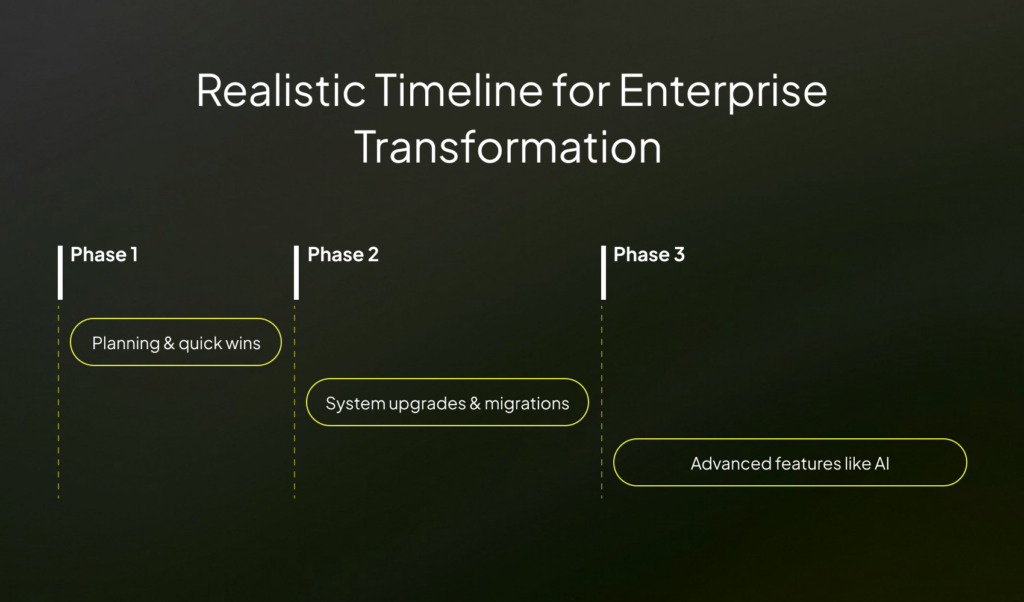
Transformation happens in phases. Each phase builds on the previous one.
- Phase 1 (0–6 months): Planning and quick wins
- Phase 2 (6–14 months): System upgrades and migrations
- Phase 3 (14–24 months): Advanced features like AI
Cost of Digital Transformation (What to Expect)
Costs depend on several factors. Company size and system complexity play a big role. Tool selection also affects budgets.
Short-term costs can feel high. But long-term savings often justify the spend. Faster systems reduce manual work and downtime.
Outsourcing some work to software development outsourcing services can reduce cost and speed up delivery. But ensure to be very careful during vendor selection.
Expected Results (ROI and Benefits)
Modern systems launch products faster. That gives a strong edge in competitive markets. Speed matters more than ever today.
Costs reduce over time with automation and better scaling. Customer journeys improve with faster and more stable systems.
Scalability becomes easier with cloud-native design. Systems handle spikes without breaking or slowing down.
Summing Up
Digital transformation takes time. But the right roadmap takes out much of the complexity. Start small and stay focused. Each move should support real business goals and long-term growth. If you need expert help, connect with Imenso Software to plan and execute your transformation with confidence.
Turn your transformation roadmap into reality.
Similar Posts
ERP vs Custom Enterprise Software: Which Is Right for Your Business?
Do you feel like your business is a leaky bucket? Even though you are doing everything in your capacity to better it, desirable results still elude you. The problem lies in small, daily inefficiencies. For example, wasted materials, a redundant manual process, think of all these as leaks. They are what is killing your profit […]...
Legacy System Modernization: Why Enterprises Choose Outsourcing Over In-House
Legacy systems are difficult to maintain and highly vulnerable to security loopholes. Modernizing them offers benefits that go way beyond cost savings. It helps businesses reduce downtime, achieve compliance, and protect against cyber threats. A comparison of these expected gains with the disadvantages of legacy systems allows enterprises to clearly comprehend the modernization outcomes. Outsourcing […]...
Enterprise Software Development Stages: A Complete 6-Step Guide
Organizations around the world spend over $5 trillion on enterprise software. It’s a rapidly growing industry because of the various benefits it offers. From higher productivity via automation to data-driven decisions, it positively impacts all facets of an organization. However, creating such a solution isn’t straightforward. From planning to implementation, there’s so much that goes […]...