How Much Does Custom Software Development Cost in 2026? Full Breakdown

Key Takeaways
- Custom software cost in 2026 falls between $30K to above $800K.
- Features, design, tech stack, and integrations directly increase your total cost.
- Hidden costs can add 30 to 50% to your budget. It’s critical to plan for them.
- AI can reduce costs by at least 10%. But it is not a replacement for skilled developers.
- Start with an MVP and validate your idea. Only then scale to control costs better.
Custom software development cost in 2026 depends on:
- Size
- Features, and
- Complexity
Based on these factors, here is a simple cost breakdown:
- MVP: $30,000 – $80,000
- Mid-level software: $80,000 – $250,000
- Enterprise software: $250,000 – $800,000+
Cost at a Glance
| Project Type | Cost Range | Timeline | Best For |
| MVP | $30K – $80K | 2–4 months | Startups testing ideas |
| Web App | $50K – $150K | 3–6 months | Business tools, portals |
| SaaS | $80K – $250K | 4–9 months | Subscription platforms |
| Enterprise | $250K – $800K+ | 6–18 months | Large organizations |
| AI Software | $120K – $500K+ | 6–12 months | Automation, analytics |
What Affects Software Development Cost?
Before choosing custom software development services for startups, understand these cost drivers:
Project Size and Complexity
A simple tool is quick to build. A complex platform takes much more time.
- A basic internal dashboard may cost around $30,000–$50,000
- A multi-module platform (like ERP or SaaS) can go beyond $200,000
Number of Features
More features mean more coding, testing, and maintenance.
- A simple login system is low cost
- Adding chat, notifications, analytics, and payments increases cost quickly
For example:
- Adding a real-time chat feature can add $8,000–$20,000
- Adding a payment system can add $5,000–$15,000
Design Requirements
Design is not just about looks. It affects user experience and usability.
- Basic UI with templates costs less
- Custom UI/UX with animations and branding costs more
Tech Stack Used
Your specific tech stack also impacts cost.
- Standard stacks (like MERN or LAMP) are more affordable
- Advanced tech like AI, blockchain, or real-time systems increases cost
Third-Party Integrations
Most apps connect with other services. These integrations save time but still add cost.
- Payment gateways (Stripe, PayPal)
- Maps (Google Maps API)
- CRM or email tools
Also, many APIs charge monthly fees, which adds ongoing cost.
Security and Compliance Needs
Security is critical, especially in regulated industries.
- Basic apps need standard security
- Industries like healthcare and fintech need strict compliance. Adding HIPAA and advanced security audits massively increase costs.
Cost Breakdown by Project Size
This helps you match your idea with a realistic budget.
Small Projects (MVPs and Basic Tools)
- Cost: $30,000 – $80,000
- Timeline: 2–4 months
- Example: simple booking app or basic marketplace
Medium Projects (Business Apps and SaaS)
- Cost: $80,000 – $250,000
- Timeline: 4–9 months
- Example: CRM system or SaaS dashboard
Large Projects (Enterprise Platforms)
- Cost: $250,000 – $800,000+
- Timeline: 6–18 months
- Example: ERP system or large fintech platform
Cost by Software Type
Different software types come with different pricing.
Web Applications
- Cost: $50,000 – $150,000
- Used for dashboards, admin panels, portals
Mobile Apps
- Cost: $60,000 – $200,000
- iOS and Android apps increase cost if built separately
SaaS Platforms
- Cost: $80,000 – $250,000
- Includes subscriptions, user roles, and cloud hosting
AI-Powered Software
- Cost: $120,000 – $500,000+
- Includes machine learning models and data processing
Spending in the IT domain was around $5.6 trillion last year. But even this massive amount hasn’t been able to reduce cost inefficiencies.
Enterprise Systems
- Cost: $250,000 – $800,000+
- Complex systems with high security and integrations
How AI Is Changing Software Development Costs in 2026
Around 91% of companies are using AI tools in development. 61% of them expect cost reductions of 10% to 25%.
This means AI is helping reduce effort. But it is not making software “cheap.”
Where AI Helps Reduce Costs
AI is most useful in repetitive and time-consuming tasks. This is where you will see real savings.
Here are the main areas:
- Code generation
Tools like AI coding assistants help developers write code faster. This reduces development time. - Testing and QA
AI can generate test cases and detect bugs early. This lowers manual testing effort. - Debugging
AI tools can suggest fixes quickly. This reduces time spent on errors. - Documentation
AI can create basic documentation automatically. This saves time for developers. So, teams can deliver faster with fewer hours.
Where Costs Do Not Reduce Much
AI does not reduce costs in every area. Some parts still need human expertise. Costs remain high in these areas:
- System architecture
You still need experienced developers to design the system. - Complex logic and workflows
AI cannot fully understand business-specific rules. - UI/UX design
Good design still needs human creativity and user research. - Security and compliance
These require careful planning and manual checks. - Product strategy
AI cannot replace decision-making and planning.
So, while AI speeds up work, it does not replace skilled teams.
Impact of AI on Project Costs
| Area | Impact of AI |
| Development speed | Faster delivery |
| Overall cost | Reduced by 10–25% in many cases |
| Team size | Slightly smaller teams possible |
| Quality | Better if used correctly |
Industry-Specific Software Development Costs in 2026
Here are common industries and their typical cost ranges.
| Industry | Cost Range | Key Cost Factor |
| Healthcare | $75K – $250K+ | Compliance and security |
| FinTech | $90K – $300K+ | Security and regulations |
| Logistics | $70K – $200K+ | Real-time tracking |
| E-commerce | $50K – $200K+ | Features and integrations |
| EdTech | $60K – $180K+ | Scalability and content |
Cost by Development Stage (Where Your Money Goes)
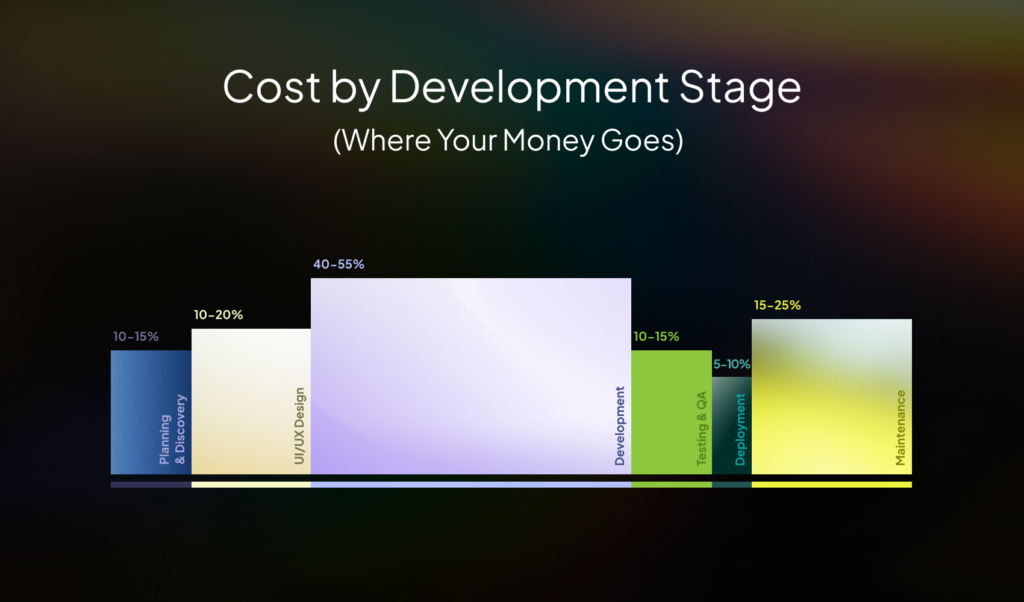
Your budget is split across different stages. Here is a simple breakdown.
- Planning and discovery (10–15%)
Requirement gathering and roadmap creation - UI/UX design (10–20%)
Wireframes, prototypes, and user experience - Development (40–55%)
Frontend and backend coding - Testing and QA (10–15%)
Bug fixing and quality checks - Deployment (5–10%)
Launch and setup - Maintenance (15–25% yearly)
Updates, bug fixes, and improvements
Hourly Rates by Developers (2026)
Hourly rates depend on experience, location, and demand.
Hourly Rates by Role and Experience
| Role | Junior (0–2 yrs) | Mid-level (2–5 yrs) | Senior (5+ yrs) |
| Developer | $20 – $50 | $40 – $100 | $80 – $150+ |
| UI/UX Designer | $25 – $60 | $50 – $90 | $80 – $120 |
| QA Engineer | $20 – $50 | $40 – $70 | $70 – $90 |
| Project Manager | $30 – $60 | $50 – $90 | $90 – $130 |
Hourly Rates by Region
| Region | Average Hourly Rate |
| USA | $100 – $200 |
| Western Europe | $80 – $150 |
| Eastern Europe | $40 – $90 |
| Latin America | $30 – $80 |
| India | $20 – $60 |
| Southeast Asia | $20 – $50 |
| Offshore blended teams | $25 – $80 |
How to Build a Cost-Effective Hybrid Team
Many startups do not rely on just one region. Instead, they build a hybrid team to balance cost and quality. Below is a commonly used approach.
- Use senior developers from the USA or Europe for architecture
- Hire mid-level and junior developers from India or Eastern Europe
- Add offshore QA engineers to reduce testing costs
- Keep a project manager to coordinate everything
This helps:
- Reduce overall cost
- Maintain quality
- Scale your team easily
Ready to Estimate Your Project?
Pricing Models in Custom Software Development
Before you choose a development partner, you should understand how pricing works. Here are the most common pricing models.
Fixed Price Model
This model works best when your requirements are clear from the start.
- You agree on a fixed scope, timeline, and cost
- The price does not change unless the scope changes
This model is simple and predictable. It is often used for small projects or MVPs. However, there is a catch:
- It is not flexible
- Any change in features can increase cost and delay delivery
Best for:
- Small projects
- MVPs with clear requirements
Time and Material Model
This model is more flexible. You pay based on actual work done.
- You are billed hourly or daily
- Cost depends on time spent and resources used
This model gives you more control during development. It works well when:
- Requirements are not fully clear
- You expect changes during development
But keep in mind:
- Final cost is not fixed
- It can increase if the project scope grows
Best for:
- Startups building evolving products
- Complex or long-term projects
Dedicated Team Model
In this model, you hire a full team that works only on your project.
- You pay a monthly fee for a team
- The team works like your extended in-house team
This gives you full control and better collaboration. It is useful when:
- You need ongoing development
- Your product will keep evolving
Things to consider:
- Higher monthly cost
- Requires active involvement from your side
Best for:
- Scaling startups
- SaaS platforms
- Long-term product development
Retainer Model
This model is used for ongoing support and updates.
- You pay a fixed monthly fee
- You get a set number of hours or services
It works well when:
- Your product is already built
- You need regular updates or maintenance
Limitations:
- Not ideal for building a product from scratch
- Unused hours may not always roll over
Best for:
- Maintenance
- Continuous improvements
- Bug fixes and updates
Comparison Table
| Model | Cost Predictability | Flexibility | Best For |
| Fixed Price | High | Low | Small, clear projects |
| Time & Material | Medium | High | Evolving projects |
| Dedicated Team | Medium | Very High | Long-term development |
| Retainer | High | Medium | Maintenance and support |
Which Model Should You Choose?
- Choose fixed price if your idea is simple and well-defined
- Choose time and material if you expect changes
- Choose a dedicated team if you are building a long-term product
- Choose a retainer for ongoing support
Hidden Costs You Should Not Ignore
Hidden costs are the main reason why budgets go out of control. Only 34% of projects stay within budget. For 55% of project managers, cost overruns are a major reason projects fail.
This shows that poor planning and missing cost factors lead to budget problems.
Common Hidden Costs
Below are the most common hidden costs and their affect your budget.
Maintenance (15–25% every year)
Software is never “done.” You need updates, bug fixes, and improvements.
- Usually costs 15–25% of the initial development cost per year
- Includes performance fixes and feature updates
Hosting and Infrastructure (5–20%)
Your software needs servers to run. This cost grows as your users increase.
- Cloud platforms like AWS, Azure, or Google Cloud
- Costs increase with traffic and storage
Third-Party APIs (Can increase costs by 10–25%)
Most modern apps depend on external services. These services charge based on usage. Over time, this adds up. These include:
- Payment gateways
- Maps and location services
- Email or SMS providers
Security and Compliance (10–20%)
Security requires regular updates and monitoring. Security-related costs include:
- Security patches
- Data protection measures
- Compliance with regulations
Scaling Costs (10–30% increase over time)
As your product grows, your system needs to handle more users. This can increase infrastructure and development costs significantly. Cost comes from:
- More servers
- Better databases
- Load balancing
Project Management Overhead (10–20%)
Managing a project also costs money. Money is spent in:
- Planning and coordination
- Meetings and reporting
- Timeline management
How Hidden Costs Add Up
Hidden costs can increase your total budget by 30–50% in many cases. Here’s an example for better understanding.
Example: $100K Project
| Cost Component | Estimated Cost |
| Initial development | $100,000 |
| Maintenance (20%) | $20,000 |
| Infrastructure and APIs | $10,000 |
| Security and scaling | $10,000 |
| Project overhead | $10,000 |
| Final cost | $150,000 |
A $100K project can easily become $150K.
Realistic Budget Formula
To avoid surprises, you should always plan beyond the base cost.
A simple way to estimate:
Total Cost = Base Cost + 30% to 50% buffer
For example:
- Base cost: $100,000
- Add 30% buffer: $30,000
- Final estimate: $130,000
This gives you a safer and more realistic budget.
Real Examples: What Different Budgets Get You
Let’s help you visualize what you can build.
$50K Project
This budget is usually used for a basic MVP.
What you can build:
- A simple booking platform (like a basic appointment app)
- A small e-commerce store with limited products
- A basic internal business tool
Features you can expect:
- User login and signup
- Basic dashboard
- Limited integrations
- Simple UI with minimal customization
Team composition:
- 1–2 developers
- 1 part-time designer
- 1 QA (shared or part-time)
Timeline:
- 2 to 4 months
Best for:
- Early-stage startups
- Idea validation
$150K Project
You can build a scalable SaaS platform with solid features.
What you can build:
- A SaaS tool like a CRM or project management app
- A marketplace platform (similar to a basic Shopify-style multi-vendor store)
- A feature-rich mobile or web app
Features you can expect:
- Advanced dashboards and user roles
- API integrations (payments, email, analytics)
- Better UI/UX design
- Scalable backend
Team composition:
- 2–4 developers
- 1 UI/UX designer
- 1 QA engineer
- 1 project manager
Timeline:
- 4 to 8 months
Best for:
- Growing startups
- Businesses launching a serious product
$500K+ Project
This budget is used for long-term products built for scale, security, and performance.
What you can build:
- A fintech platform with real-time transactions
- A healthcare system with compliance features
- A large SaaS platform with multiple modules
Features you can expect:
- Advanced workflows and automation
- High-level security and compliance
- Microservices or scalable architecture
- Heavy integrations with third-party systems
Team composition:
- 5–10+ developers
- 1–2 designers
- 2 QA engineers
- 1–2 project managers
- DevOps support
Timeline:
- 8 to 18 months
Best for:
- Funded startups
- Enterprises
- High-growth platforms
How to Estimate Your Software Cost (Step-by-Step)
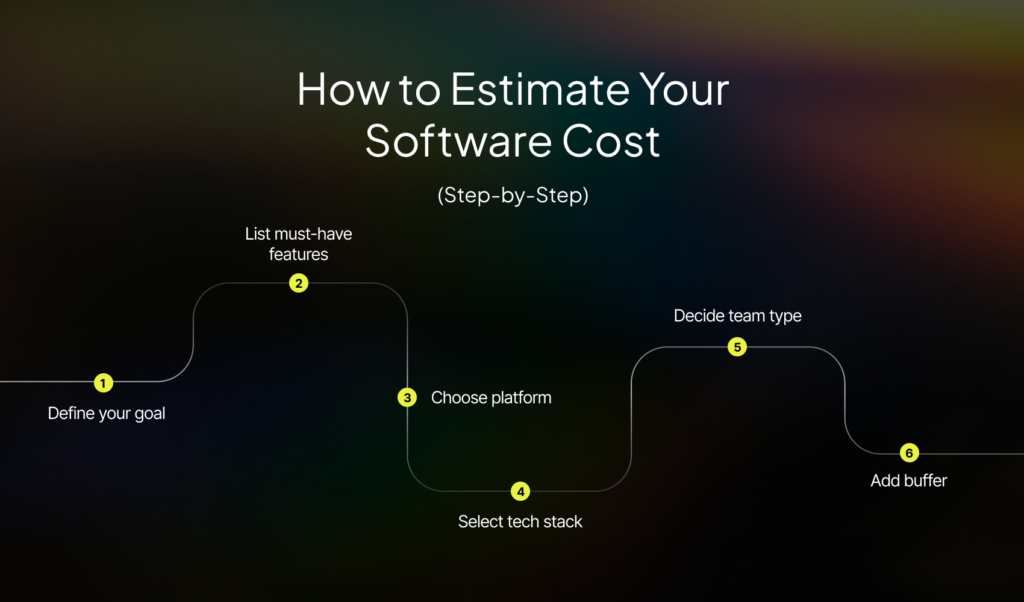
You can estimate your cost with a simple approach. Follow these steps:
- Define your goal
Be clear about what you want to build - List must-have features
Focus only on essentials first - Choose platform
Decide between web, mobile, or both - Select tech stack
Choose tools based on scalability - Decide team type
Freelancer, agency, or in-house - Add buffer (15–25%)
Always plan for unexpected costs
Cost Comparison: Freelancer vs Agency vs In-House
| Option | Cost | Pros | Cons |
| Freelancer | Low | Affordable, flexible | Limited skills, risk |
| Agency | Medium–High | Full team, reliable | Higher cost |
| In-house | High | Full control | Very expensive |
Simple Cost Calculator
Use this basic formula to estimate your budget.
Total Cost = (Hourly Rate × Hours) + Tools + Maintenance
Example:
If a project takes 1,000 hours at $50/hour:
Base cost = $50,000
Add tools and maintenance = Final cost increases
Conclusion
Custom software development cost in 2026 depends on your goals, features, and team.
- MVPs start at $30K
- Mid-level products go up to $250K
- Enterprise systems can exceed $800K
Start small. Validate your idea. Then scale step by step.
If you plan carefully, you can control costs and still build high-quality software.