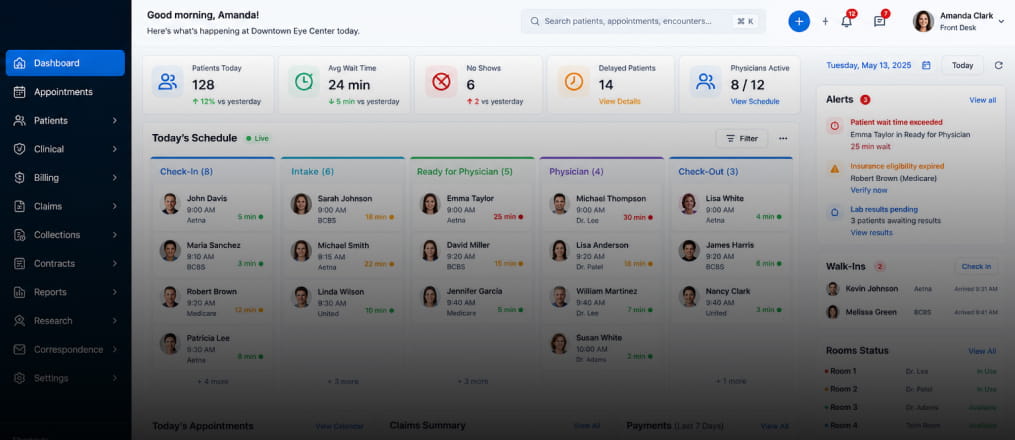
Dynamic dashboard to analyze productivity and growth.

Book a Call

About Client

Healthcare USA
About Client

Our goal is to deliver a dynamic dashboard tailored for the financial industry, providing specialized business intelligence. We've developed a financial smart dashboard featuring easily interpretable graphs and data. This enables finance organizations to achieve strategic growth, streamline decision-making, and increase productivity through dynamic data analysis.

The core challenges

Data integration

Integrating data from multiple sources, such as SharePoint folders, MySQL dumps, Excel spreadsheets, OneDrive, and various Learning Record Store (LRS) storages, can be complex. We transformed and consolidated the data to overcome this challenge.

Usability and user adoption

The original reports were likely difficult to read, visually cluttered, or lacked a clear information hierarchy. To address this, we redesigned the dashboard to focus on simplicity, clarity, and intuitive navigation, improving usability and encouraging user adoption.

Data privacy and security

Protecting sensitive financial data is crucial. We implemented Row Level Security (RLS) to filter and safeguard sensitive data, ensuring confidentiality and enhancing security.

Performance enhancement

Dashboards can become slow due to excessive information and complex calculations. To maintain efficiency, we optimized the data model and report layout.

Integrating data from multiple sources, such as SharePoint folders, MySQL dumps, Excel spreadsheets, OneDrive, and various Learning Record Store (LRS) storages, can be complex. We transformed and consolidated the data to overcome this challenge.

The original reports were likely difficult to read, visually cluttered, or lacked a clear information hierarchy. To address this, we redesigned the dashboard to focus on simplicity, clarity, and intuitive navigation, improving usability and encouraging user adoption.

Protecting sensitive financial data is crucial. We implemented Row Level Security (RLS) to filter and safeguard sensitive data, ensuring confidentiality and enhancing security.

Dashboards can become slow due to excessive information and complex calculations. To maintain efficiency, we optimized the data model and report layout.

Solution

Solution
1

How we did it

Solution
1

How we did it

Gauge charts for targeted analytics

We utilize gauge charts to provide accurate forecasts of accounting performance, deficits, and premiums earned, leveraging historical data for precise analytics.

Row-Level security (RLS)

To enhance data security, we implement Row-Level Security (RLS), which filters data based on predefined criteria, ensuring that sensitive information is accessible only to authorized users.

Enhanced user interface

The user interface is meticulously designed to enhance accessibility and usability, featuring improved navigation and interactive elements tailored for financial industry professionals.

Embedded reports

Our solution allows for the embedding of reports and dashboards into custom applications or websites, expanding the reach and usability of financial insights.

Data modeling

We employ robust data modeling techniques to effectively organize and structure data, maximizing the analytical and visualization capabilities within Power BI, ensuring comprehensive insights and data-driven decision-making.

Enhancement. By adding useful features.

Synchronizing slicers

With synchronized slicers on every page, users can easily browse the data and maintain uniform filtering across various representations, enabling a seamless analytical experience.

Page and visual level filters

Utilizing both page and visual level filters, users can now filter pages and visuals according to specific requirements, ensuring a customized viewing experience.

Bookmarks

With bookmarks, users can easily navigate between several chart representations inside the same canvas by selecting different actionable buttons. This allows for dynamic chart displays.

Dynamic visualization techniques

Adding different kinds of charts, like line and cluster columns, stacked bars, areas, pie, donuts, and cards, makes the dashboard look better and makes the user experience more interesting and immersive.

Tech Stack

Explore more. Additional features.

Schedule refresh

We configured reports to automatically refresh data at scheduled interval ensures users always have access to the latest insights and analytics.

Key performance measurements

Included a wide range of Key Performance Indicators (KPIs) designed to evaluate and improve the efficiency and overall performance of financial operations.

Export preferred charts/KPIs

With the export feature, users can easily clean up their data and save it.There are several methods to export a BI report. Here's a list of common export methods. PowerPoint, PDF